CI / CD Pipeline Documentation
This document outlines the Continuous Integration and Continuous Deployment (CI/CD) pipeline for the project.
Overview
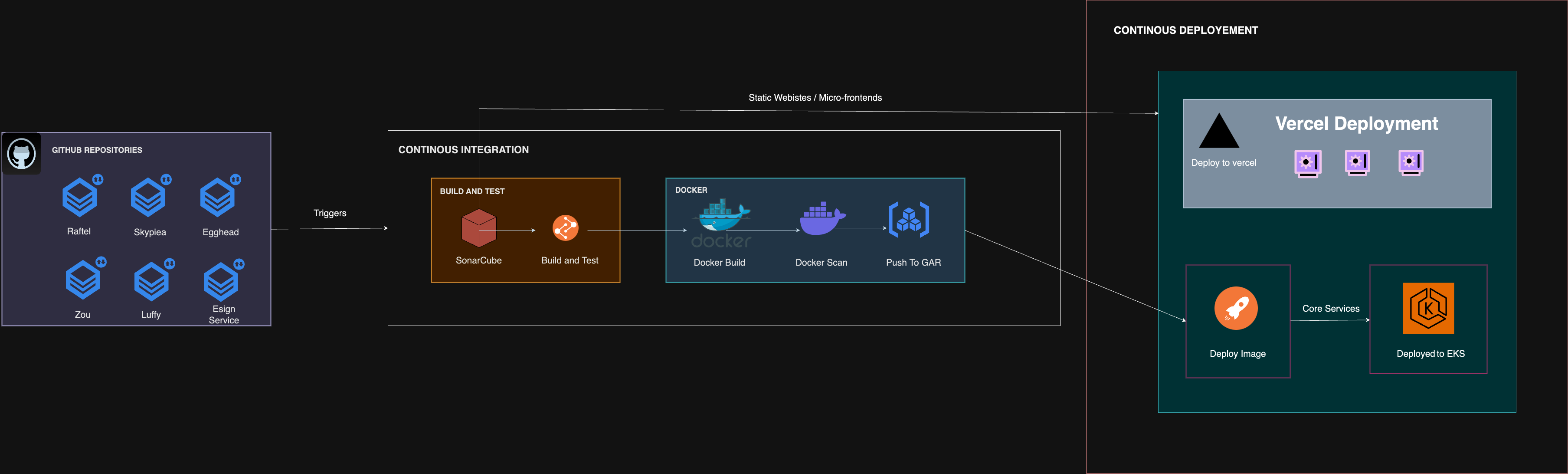
The pipeline process is as follows:
- Code Push to GitHub
- GitHub Action Trigger on Main Branch Merge
- SonarQube Code Analysis
- Build the Application
- Unit and Integration Testing
- Testing coverage check ( Coverage > threshold ( 80% ))
- Build the Docker Image
- Scan the Docker
- Push the Docker to Artifact Register
- Trigger the Deployment
- Deploy the image to EKS
- Deploy the application to Vercel
Pipeline Phases
GitHub Repositories
The pipeline starts with the source code stored in GitHub repositories. This is where you manage and track changes to your project.
Actions
GitHub Actions help you automate your software development workflows in the same place you store code and collaborate on pull requests and issues. A github action will be triggered when a feature branch is merged to respective branches for each environment.
Environment Branches
- Develop :
develop - Staging :
staging - Production :
main
SonarQube Code Analysis
Your code is then analyzed by SonarQube for bugs and code smells. The Quality Gate is the best way to enforce a quality policy in your project. If the code fails to meet the criteria set by the Quality Gate, the process will not proceed to the next phase.
Build the Application
In this phase, the application is built using the appropriate build tool depending on the programming language used.
Unit and Integration Testing
The built application goes through Unit and Integration tests to ensure that the individual components and the whole system work correctly.
After Coverage > threshold ( 80% )
The code coverage of the tests must be above 80% to move further in the deployment process.
Docker Image Build
In this step, the Docker image begins building for the tested application. All necessary environment variables for the build step are stored in the GitHub Actions environment variables for each environment.
- All required secrets and variables for the action are managed in the
marine-fordrepository for convenient maintenance. You can upload the variables and secrets for each repository and environment via the GitHub Actions workflow namedUpdate Secretsinmarine-ford(opens in a new tab).
Scan the Docker
The build docker image will be scanned for vulnerability using Trivy. Trivy is used to find vulnerabilities & IaC misconfigurations, SBOM discovery, Cloud scanning, Kubernetes security
Push the Docker to Artifact Register
After building the Docker image, it's stored in a central repository known as the Artifact Registry. This allows easy access for team members or systems needing the image.
Trigger the Deployment
Following a successful build, another action initiates to deploy the image onto the corresponding environment.
Note:

Depending on the repository type, the build and deployment process varies. For static websites or micro-frontends, the build and deployment happen on Vercel. Otherwise, the Docker image is deployed on EKS with all the configurations.
Deploy the Image to EKS
During this deployment step, the newly built Docker image is integrated into the Kubernetes (k8s) deployment configuration, and all associated configurations are applied within the Kubernetes cluster.
All configurations, including deployments, services, horizontal pod autoscalers (HPA), and any custom policies, are reconfigured during the release process.
Deploy the Application to Vercel
Static websites are built and deployed on Vercel based on the branch to the respective environment. All environment variables related to Vercel are stored and managed within the Vercel platform.